Takeaway

Take orders on WhatsApp,
pay zero commission.

Skip the delivery aggregators. Your existing menu, customers order straight to your WhatsApp. No middleman, no commission, no margin loss.

🎁 Launch Special: Free on all plans!
See Packages
Live Demo

This is exactly what your customer sees.

The menu below is a real QrMenum installation. Rotate your phone or open it full-screen — the genuine customer experience.

Customer Flow

Order in three taps.

No app to install, no signup, no checkout page. The browser is enough.

01
QR menu takeaway — product detail screen, customer placing order

Discover

Customer opens your menu — Instagram bio, table QR, sticker on your storefront. Categories, featured items, variants.

02
QR menu takeaway cart screen — portion and quantity selection

Cart

Powered by localStorage, no signup needed. Portion/size selection, quantity controls, sticky total bar.

03
WhatsApp commission-free takeaway order submission screen

WhatsApp

Name, phone, address, note. The order lands in your WhatsApp as a clean, formatted message. The customer is on your list.

Differentiator

What is the aggregator really taking from you?

Wolt, Uber Eats, Glovo — they opened a door, but walked your customer out of it.

Wolt / Uber Eats / Glovo
QrMenum QrMenum Takeaway
12-25% commission
0% commission
Customer must install an app
Browser is enough
Customer data lives on the platform
The customer is yours (WhatsApp list)
Single language
Multilingual (EN/TR/DE/RU…)
Separate POS, separate dashboard
Inside your existing QR menu panel
Tiny restaurant logo
Your brand, your page
One price, one item list
Dine-in ≠ takeaway price, separate item selection
Owner Dashboard

One tap on. One tap off.

Off-season? Switch it off. Busy weekend? Switch it on. No new app, no new dashboard — it lives inside your existing QrMenum panel.
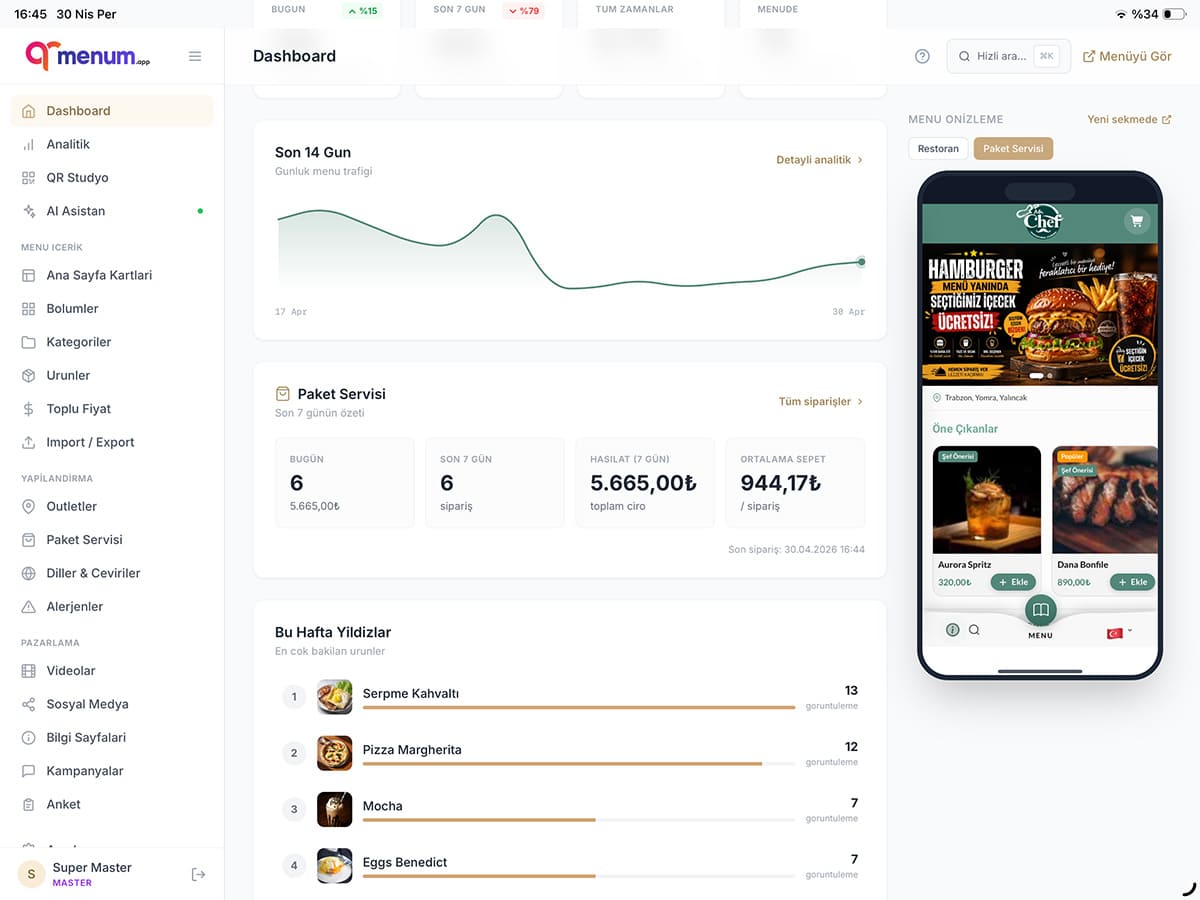
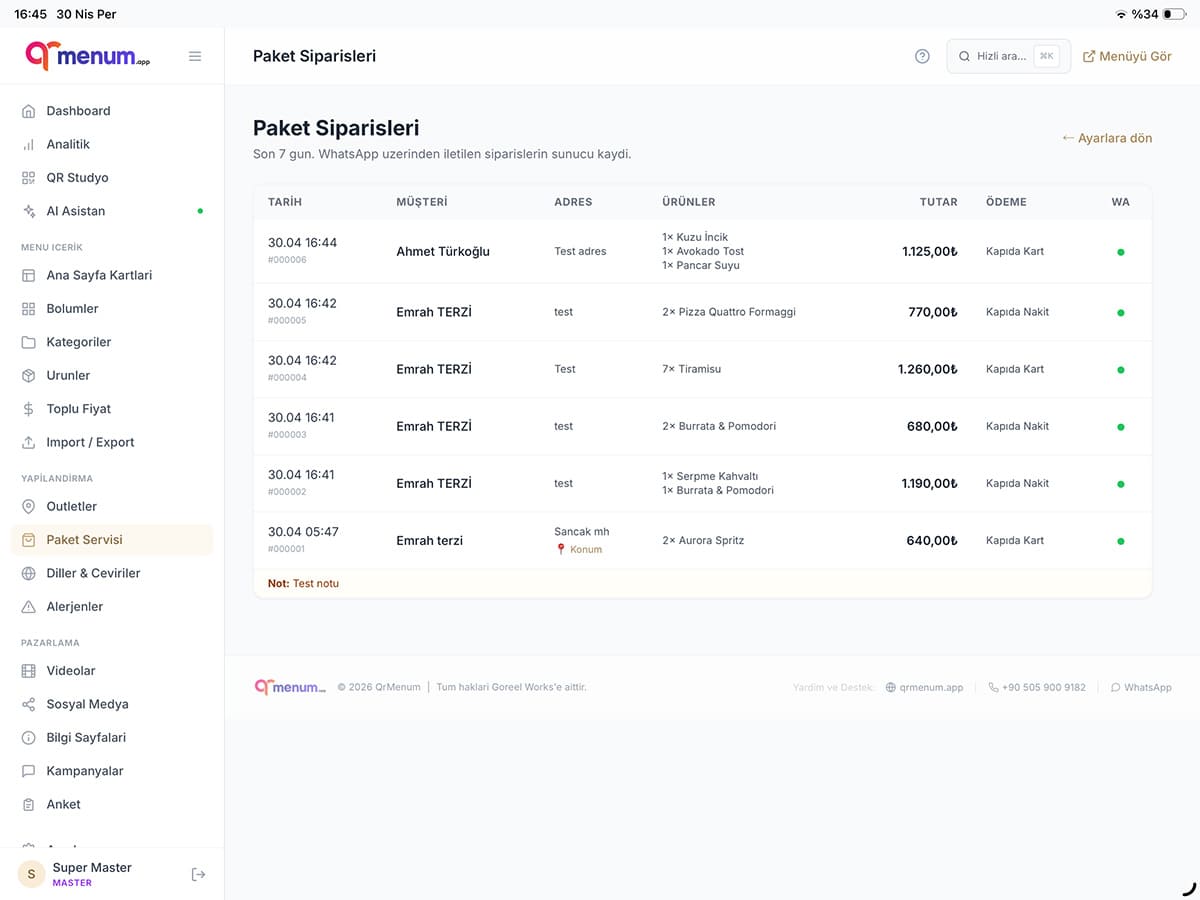
QrMenum admin panel — takeaway dashboard, revenue and order summaries QrMenum admin panel — takeaway order list, filtering and history
  • On/Off Toggle

    Break, closing, out of stock — one tap and the menu shows "not accepting orders right now".

  • Delivery Settings

    Minimum basket, delivery fee, business hours, prep time, WhatsApp number — all on a single page.

  • Order List

    Who ordered what, which address, when, how much. Filter, search, full order history.

  • Item Selection

    Which items go into takeaway? Frozen desserts, creamy cakes, hot soup — hide items that wilt or melt in transit with one tap. The dine-in menu stays exactly the same.

  • Dine-in ≠ Takeaway Pricing

    Two different prices for the same item. Pass packaging or delivery cost to takeaway — e.g. burger ₺250 in-house, ₺270 for takeaway. Bulk percentage override or per-item.

  • Analytics Dashboard

    Today's orders, last 7 days vs previous week (delta %), revenue, average basket, daily chart.

Multilingual

Don't lose the tourist.

47 UI translation keys + per-language campaign visuals. German tourists in Bodrum, Russians in Antalya, Brits in Istanbul — each orders in their own language. Something the big aggregators do not have.

  • Turkish
  • English
  • German
  • Russian
  • Arabic
  • +27 more
🎁 Launch Special

Takeaway Module

₺5,000 ₺0 for 12 months

Launch-special offer · After 12 months it renews at the standard rate; cancel any time.

FAQ

Quick answers.

Is there a commission? How does it differ from Yemeksepeti / Uber Eats?
Zero commission. Platforms like Yemeksepeti, Uber Eats, or Deliveroo charge 15–25%; on a ₺200 order the restaurant keeps ₺150–170. Through QrMenum the full amount stays with you. No middleman: customer is in direct contact with you, customer data stays with you, campaign decisions are yours. 12 months free during the launch period, then a single annual module fee.
Is my existing menu ready for takeaway?
Yes. The products, categories, variants, and visuals already in your QrMenum panel become the takeaway menu as-is. No separate menu setup. Items that aren't suitable for takeaway (e.g., dishes with special table presentation) can be hidden with one click. Setup is about 10 minutes for existing customers.
How does the customer pay? Is there cash on delivery?
Two payment options; you choose which to enable from the panel. Online payment (Iyzico): Visa, Mastercard, Troy — payment is collected with the order; the courier just delivers. QrMenum charges no commission; only Iyzico's standard processing fee applies (~2.5%, lower for debit cards). Cash on delivery: cash or card (courier's POS). Practical tip: enable both — online payment share is typically 60–70%.
Who handles delivery? Do we use our own courier?
The courier is your responsibility — we provide the order infrastructure, not delivery. Your own courier, a courier service you partner with, or courier-as-a-service integrations (Bisi, Trendyol Express, etc. — in the Enterprise plan). If the customer picks up at the restaurant, enable "self pickup"; no courier needed. Delivery fee is set in the panel by zone or order amount. You can draw a delivery-zone boundary — orders outside don't go through.
Can I switch it off off-season?
Of course. One toggle in the panel turns takeaway off — the menu stays the same, only the order button hides. Switch back on whenever. Open it for the summer menu, close it during the year-end rush, reopen the next day — flexibility is entirely yours.

Restaurant and takeaway. One system.

Same customer, same menu, same panel. Just one extra toggle. Launch special: 12 months free.

WhatsApp'tan yazın Ortalama yanıt: 10 dk